Platform Application
Summary
Our Slingr-based platform offers efficient management of multiple funcionalities
Our Slingr-based platform offers efficient management of multiple funcionalities
Goal
The aim of the platform is to consolidate all the essential features into an integrated solution for a hypothetical insurance company.📃
📢
✉️
📊
Features
- Users groups
- Policies management
- Claims management
- Metrics dashboard
Users groups 👱🏼
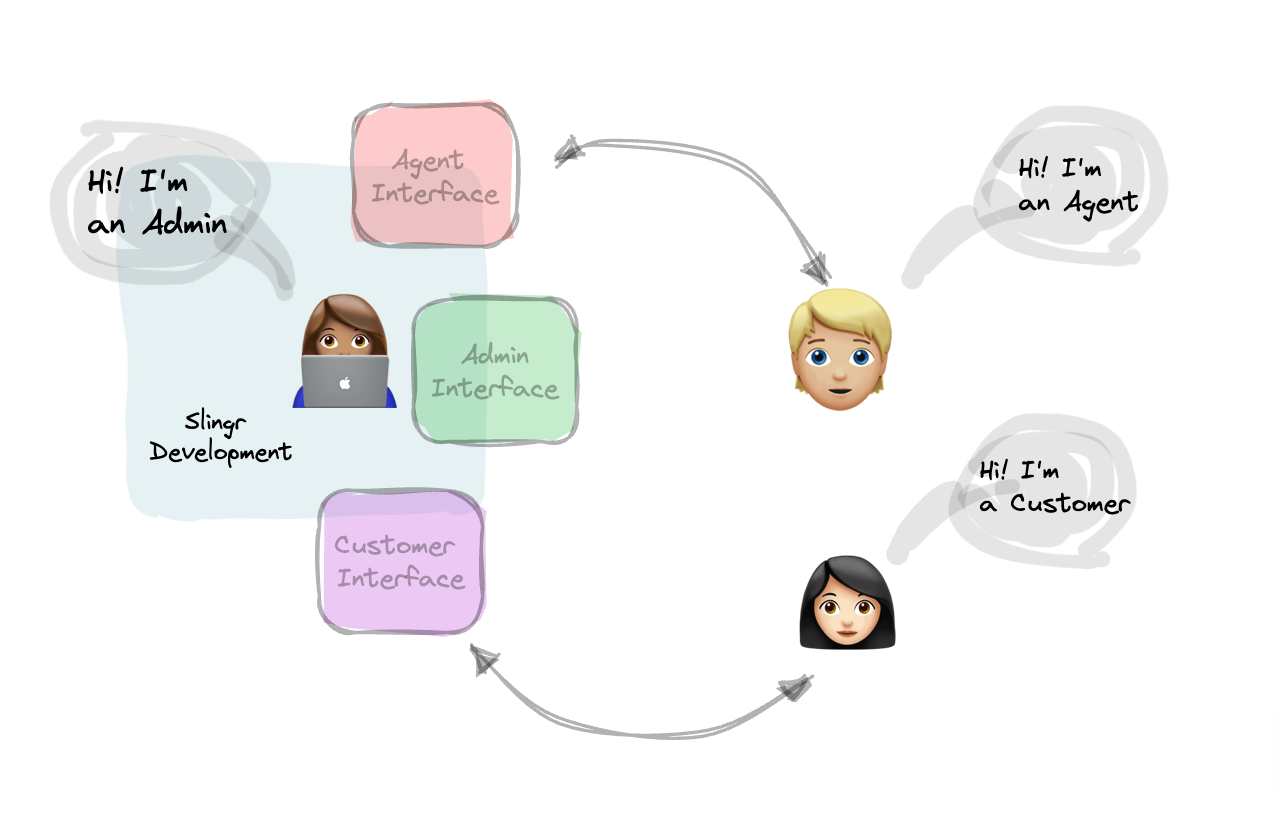
Administrators:
The admin is a user with full control over the insurance app's functionality and data. This user has access to Agents:
An agent is a user who is responsible for selling and managing insurance policies on behalf of the insurance company. This user typically has access to specific parts of the app, such as customer information, policy information, and claims. The agent can create and manage policies, track claims, and communicate with customers.Customers:
The customer is a user who purchases insurance policies from the insurance company through the app. This user can browse available policies, request quotes, purchase policies, and file claims. The customer can view policy details, premiums, and claim history. They can also communicate with agents or customer support for assistance.
all features and can manage user accounts, policies, claims, and other critical data. The admin can add or remove agents, view reports, and configure system settings.Admins have
access to all information about admins, agents, and customers, as well as platform functionalities like "restore data".❇️ Restore Data - the process of copying
backup data from secondary storage and restoring it to its original location or a new location.The Admin Panel includes a metrics dashboard, policies section, claims section with standard and workflow views, customers section, and administration section. The settings section has "restore data" functionality to reset the app data to default values.
Although agents have a smaller scope of functionalities compared to administrators, they play an important role in the app.
Agents have access to the claims panel, but only for their respective customers' claims. They can also access a view that lists all their customers to have a global view of them. In the administrator section, agents can view all types of coverages.
Agents have access only to their own information, while global information is exclusively available to administrators.
Customers are the clients of the app. Everything is done for simplifing their user interface. They have access to a policies view and a claims managment view where they can report claims of their policies
Policies management 📃
In the context of insurance, a policy is a contract between an insurance company and an individual or organization that outlines the terms and conditions of the insurance coverage. It specifies the type of coverage being provided, the amount of coverage, the cost of the coverage , the length of time the policy is in effect, and any other relevant details of the agreement.The policy serves as a legal document that both the insurer and the insured must adhere to.Depending on the user's group, they can create, edit, delete, and read their own policies or policies of others within their panel. These policies can cover various areas such as home, health, or car insurance.
In the policies management of an insurance app, the roles and permissions of admin, agent, and customer typically differ as follows:
- Admin: The admin user has full control over policies management in the insurance app. They can create, edit, delete, and manage policies as well as policyholders. The admin can also view reports and analytics related to policies, such as premiums collected and claims filed. Additionally, they can configure system settings and manage user accounts, including agents and customers.
- Agent: The agent user typically has limited control over policies management, as their primary role is to sell and manage policies on behalf of the insurance company. They can create new policies and manage policyholders, such as adding or removing beneficiaries, updating contact information, and processing policy renewals. Agents can also view policy details and premiums, track claims, and communicate with customers regarding policy-related inquiries.
- Customer: The customer can only manage their own policies and policyholders. They can view their policy details, make premium payments, file claims, and communicate with agents or customer support for assistance. The customer can also initiate policy changes, such as adding or removing beneficiaries, updating contact information, and making policy renewals.
Claims management 📢
An insurance claim is a formal request made by a policyholder to an insurance company, asking for compensation or coverage for a loss or damage covered by the policy.In the claims management of an insurance app, the roles and permissions of admin, agent, and customer typically differ as follows:
- Admin: The admin user has full control over claims management in the insurance app. They can view and manage all claims filled by customers, assign claims to agents for review and processing, and make claim-related decisions, such as approving or denying claims. The admin can also generate reports and analytics related to claims, such as the number of claims filed, amount paid out, and claim processing times.
- Agent: The agent user can assist in the claims process by reviewing claims assigned to them by the admin, communicating with customers regarding claims, and updating claims statuses. They can also provide recommendations to the admin on whether to approve or deny claims based on their expertise.
- Customer: The customer can file claims, provide supporting documentation, and track the progress of their claims. They can communicate with agents or customer support for assistance or updates on the claims process.
📌 access to claim's workflow view - Includes claim's of
all Customers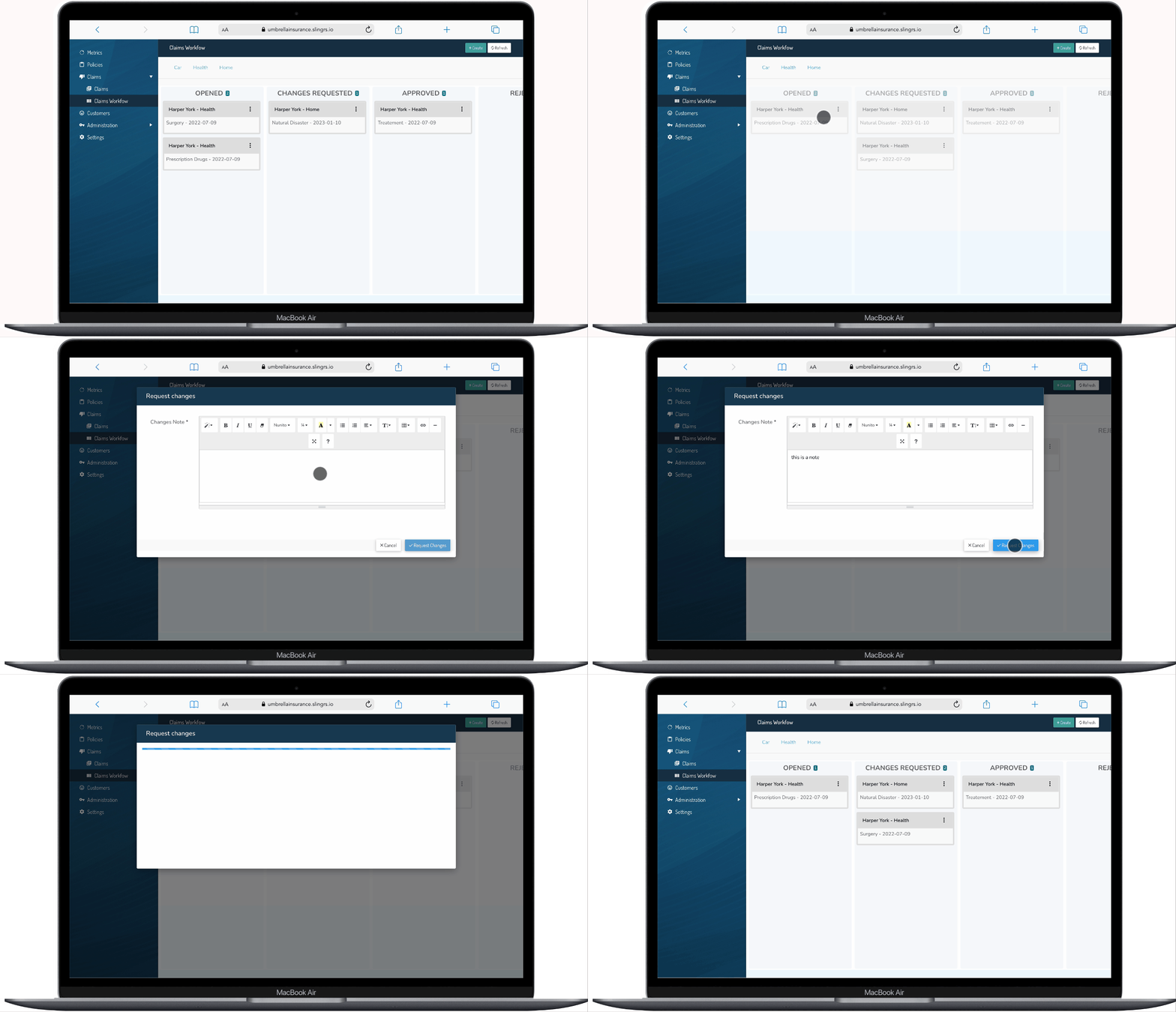
📌 access to claim's workflow view - Includes claim's of
their own CustomersMetrics dashboard 📊
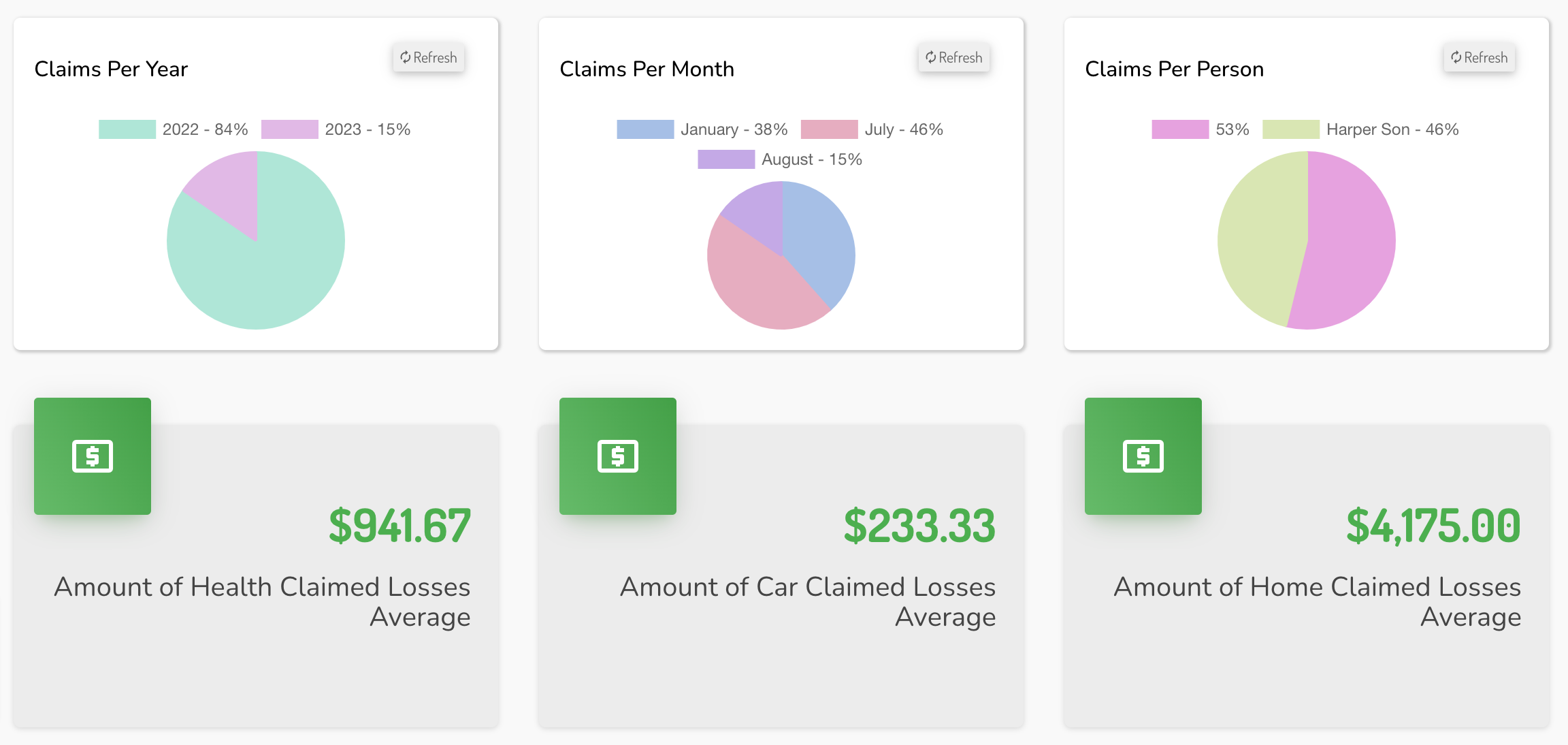
A metric dashboard is a tool used by businesses to track important metrics and make data-driven decisions. It uses charts and graphs to display key performance indicators and trends in an easy-to-understand way.The dashboard can be customized to focus on specific metrics and provides a quick overview of performance.
Our app has a customized metric dashboard that covers the important areas of the insurance industry. This feature, powered by Slingr technology, helps admins analyze data and make informed decisions to improve app performance.
The dashboard provides a simplified view of key metrics, making it easy to monitor performance and understand the app's functionality.
This is a testament to our commitment to providing the best tools and resources for admins to excel in the fast-paced and dynamic insurance industry.